
Before placing a Quick Turn order, please take the following requirements into consideration:
- Minimum of 12 items
- ONLY produced at our Swanton warehouse
- ONLY available with certain styles/colors/sizes listed in our digital catalog
- ONLY available with Screen Print
- 1 location per order
Follow the steps below on creating a Quick Turn quote:
-
Select the Quick Turn order code when starting a new quote.
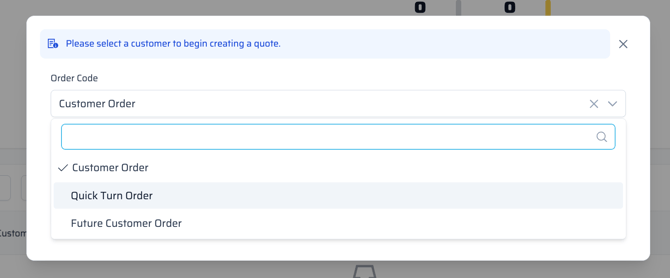
- Select the customer and start your quote.
- If the order code is not changed to QUICK, it will process through FDM4 as a regular order.
- Add an existing item, and filter, under the search bar, and select "Quick Turn" (see below image).
 **If the item is not in this list, it is not eligible for this program.
 - When creating a design, keep in mind this program only allows 1 Screen Print design with one location.
FAQ'S
What is a Quick Turn Order in QQ?
- This is an expedited order program offering quick delivery of select in-stock products with limited art options.
Can Quick Turn orders be entered into FDM4?
- No, the order type for Quick Turn cannot be accessed in FDM4. It must be entered through Quick Quote.
Will my art be done in a timely manner?
- Yes, the art team is dedicated to making these priority and getting art to the customer as quickly as possible.
Are all sizes of a style available for Quick Turn?
-
No, not all sizes of each style will be stocked and therefore will not qualify for quick turn. The issues tab will alert if any sizes are not allowed in the program.