
Please use Sales ID 6666 for ALL personal orders
This article contains the following information about personal orders:
Personal/Employee Discount Policy
Blank Garments/Shoes/Garments produced by Vendor – AT COMMISSION COST
Team members can purchase for personal use, blank garments or shoes using COMMISSION COST. No shipping will be charged. No re-stocking fee will be charged on returned items that come from our current inventory. Catalogs can be found on our Game One website.
Rules:
- Orders must be entered through the Customer Service department or using Quick Quote.
- Quantities limited to less than 20 per order and not to be re-sold for profit.
- Includes orders that the vendors produce for us* (ASI, Uniforms, Hats)*Cost on these will include the cost of shipping. Quantity limits do not apply on these orders
- There will be no returns allowed on non-inventory items that need to be ordered.
- All Personal Orders must be paid by Credit Card at the time of entry in order to qualify for the team member discount.
- The Company logo can be embellished on garments purchased through a Tier 1 decorator (Swanton or Carroll) at no cost to the team member using House Designs (referenced below).
New Artwork/Order – AT COST + Commissioned Cost of the Decoration
Team members desiring decorated garments with original artwork will be charged cost for the item, plus the cost of the decoration, applying only to the first 36 pieces. Any additional items over 36 will be priced at the decoration's suggested sell price.
Rules:
- Orders must be entered through the Customer Service department or through Quick Quote.
- You will not be able to place orders using existing customer artwork or licensed designs.
- Orders must be paid by Credit Card at the time of entry.
- These orders will not get priority scheduling.
Requests for additional discounts and/or company "sponsorships" on an order that does not fit the guidelines as outlined above will be denied.
Order Entry Process (Quick Quote)
Follow these steps for Order Entry:
- Start a new Quote in Quick Quote, selecting your Personal Account. Do not use your Rep Promo or any other customer account to place these orders.
- Under Special Type, select "Personal Order"
- Under Promo Red, select 6666 - Personal Orders
- Terms must be CC and a card must be selected/added to the order
- Add items to the order and price them based on the item's commission cost (link: Locate Item Cost in Quick Quote)
- If adding decoration, the suggested sell price will populate. Leave a comment on your quote to have the decoration price adjusted to zero (for Game One logos) or cost (on new, no-GO logos).
Game One House Designs
Game One offers free personalization of existing brand-approved Game One logos. This art is already setup in the system using the Design IDs listed below. These are only offered in the methods listed. In Quick Quote, select "Show House Designs" or "Show House Art" in the Decoration tab. In FDM4, type the Design ID directly into the design field on the Style Entry tab.
| Image | Design ID | Description | Method/Location | Colors |
 |
123964 | GO Primary | EMB Left Chest | Black or White |
 |
123965 | GO Primary | DTF Left Chest | Black or White |
|
123966 | GO Primary | DTF Full Front | Black or White |
 |
123967 | GO Stacked Secondary | 3-D EMB Hat Front | Black or White |
|
123968 | GO Stacked Secondary | DTF Left Chest | Black or White |
|
123969 | GO Stacked Secondary | EMB Left Chest | Black or White |
 |
123970 | GO Horizontal | EMB Left Chest | Black or White |
|
123971 | GO Horizontal | DTF Left Chest | Black or White |
|
123972 | GO Horizontal | DTF Full Front | Black or White |
Adding House Art to an Order (FDM4):
- Select the style you want to order
**TIP: You must only apply the Game One logo to a Black, White, Grey (Dark or Light), Navy, Dark Green or Carolina Blue garments. This list is subject to change at anytime. - Click Quick Design
- Select Add Existing Art
- In the Add Existing Art window that comes up, toggle the box to the right of "House Artwork".
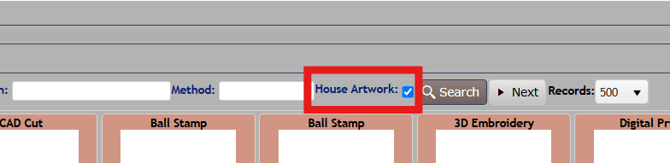
- Click Search
- All of the Game One logos above should appear in this for you to SELECT.
- After selecting the image, you must fill out the required feels as normal.
- When you get to the pencil icon, you will click that and choose either Black or White.
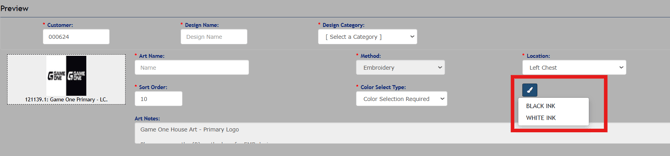
**You are only able to decorate the Game One logo in Black or White, per or Brand and Marketing guidelines. - No proof should be required for House Art orders, but if you want one please check Proof Required on the Services Screen.