
**EFFECTIVE 12/15/2026 TO 7/1/2026**
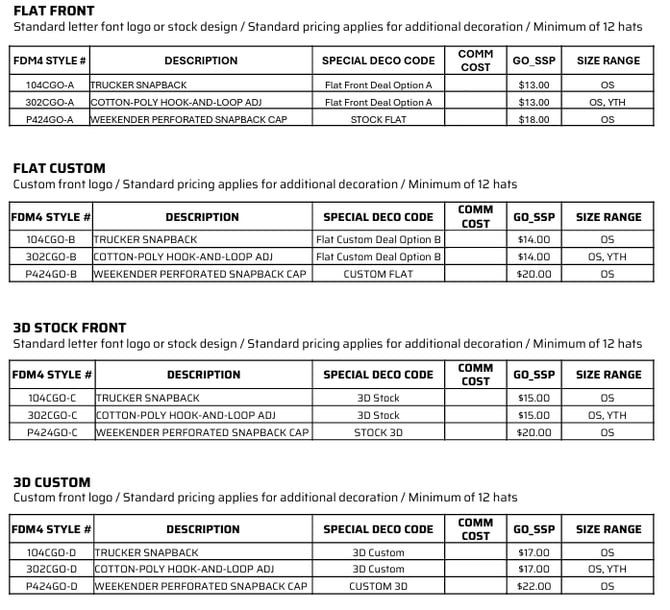
Momentec is now offering a GO Core headwear line for us at Game One. We are able to do 3-D deco and flat deco with Momentec with this program. It is broken out below by deco type. All pricing can be found on Sales Deck.
GO Core Elite Series Deco Program:
GO Core All In Headwear Deco Program:
Ordering process for BOTH deco programs:
GO CORE ELITE SERIES DECO PROGRAM:
Style & Deco Options:

Program Details:

GO CORE ALL IN HEADWEAR DECO PROGRAM
Style & Deco Options:

Program Details:
FDM4 Order Entry:
- Run Order Entry
- If the customer needs a quote, select QUOTE. Select the CUSTOM order type if they don't need a quote.
- Using one of the styles above, enter the style as normal. **DO NOT USE CITEMS**
- Select a color that is offered.
- DO NOT ADD A DESIGN TO THE ITEM.
- Commit the sizes and quantities needed (12 minimum).
- Adjust freight as needed in the Freight tab.
- Review and Complete.
- If QUOTE was selected on step 2, release the QUOTE to a CUSTOM order type.
- Using the Purchase Order number generated by FDM4, email the order to the Momentec team, decoration@momentecbrands.com.
- Make sure to include all of the details needed (see program details above).
- Include the Special Code below in the subject and body of the email, dependent on 3-D or Flat Deco and location.
- 3-D Deco:
- Front Location = "$12 ES DECO DEAL"
- Front & Back Location = "$15 ES DECO DEAL"
- Flat Deco:
- Flat Front Deal = "Flat Front Deal Option A"
- Flat Custom Deal = "Flat Custom Deal Option B"
- 3-D Deco:
Quick Quote Order Entry:
-
Navigate to SalesDeck and go to Quick Quote.
-
Enter customer information, in hand dates, activity, etc.
- Search for the product numbers above and add them to the cart.
- Add the cart to the quote.
- Enter the sizes and quantities needed (12 minimum).
- Do not add decoration.
- Adjust freight as needed.
- Leave an internal comment stating that this is a custom order.
- Submit the Quick Quote to FDM4.
- The PO# to provide to Momentec will be delayed.
- Account Manager will release the Quick Quote to an Order in FDM4.
- Account Manager will see this in ABOM and will issue a PO against vendor 3112 (Momentec-CUSTOM).
- Account Manager will send the PO to the Sales Rep for the Sales Rep to submit the order to Momentec, following the below submission process.
Order Submission:
- Email the FDM4 PO, decoration information (deco information, font style, qty & sizes, shipping method), and any other information they may need, to decoration@momentecbrands.com.