
Before creating a new customer, please note all new customers are created with credit card terms. During the creation process, a rep can request terms and/or tax exemption status and will be prompted to fill out and attach the proper forms.
For New Customer Creation, follow these steps:
- Log into SalesDeck and go to the Customer Account Center
- Click Create a New Customer Request
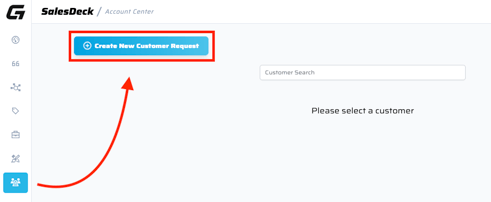
- Select either New Customer or Update Existing Customer, then fill out all required fields.
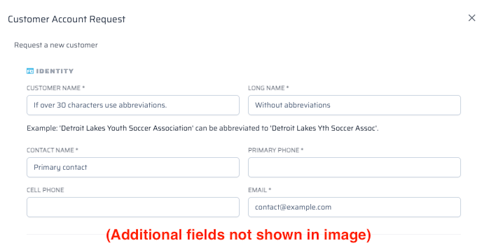
NOTE: The "Customer Name" field is limited to 30 characters. If more are needed, use the "Long Name" field for the customer's full preferred name and do your best to abbreviate it in the Customer Name box. - If requesting Net30 terms or tax exempt status, the corresponding forms can be downloaded during creation (or below). Once filled out, forms can be attached back to the request in the Customer Request Manager.
- Once submitted, the customer will sync back to SalesDeck and will be available in the Customer Account Center or when creating a Quick Quote.
NOTE: Users will no longer to be prompted to create the standard "sport" ship-to addresses. Instead, go to the Customer Account Center to create any Address Numbers needed for placing orders.
Managing New Customer Requests
All new customers are created with CC terms and will be immediately available for use in Quick Quote. If terms or tax exemption status was requested, users can track those requests via the Customer Account Center > Manage Customer Requests.
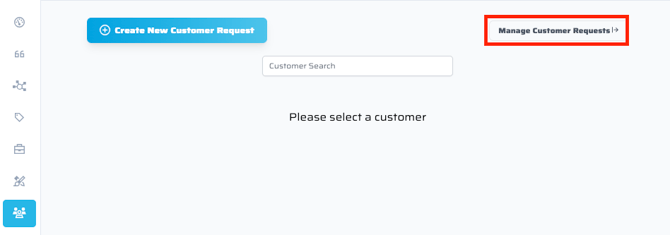
Requests will be auto-assigned to the sales rep's Billing Analyst. Clicking on a request will appear the same as an Item Request or Art Request, allowing for comments/attachment communication.